Widget csSubject
Widget csSubject
These options can be used if the values of a select widget are filled with data from the Configuration Service. The widget is rendered using Select2.
Important: The schema properties minItems and enum must be set to 0 and [].
Purpose
The Configuration Service can be used to display lists in a form using the csSubject widget. It will display a configured property of all key files in a subject folder. In order to display a list, the Configuration Service requires a subject structure like this:
- subject (folder)
    - key (file)
        - property (YAML or JSON property)
        - ...
        - ...
        - ...
    - ...
    - ...
    - ...
Each key file can exist with or without a .{locale} suffix. English and unknown locale will get the key files without locale suffix.
Options
Required
subject: Configuration Service SubjectidProperty: ID property of the key, will be saved if an item is selected. This property must exist in every key.displayProperty: Display Property of the key, will be displayed instead of the idProperty. This property must exist in every key.
Optional
sortBy: Property to sort the result onsortDirection: Direction of the sorting (ASCorDESC)filterBy: Expression to filter the results. Currently used to check if a property equals a value (e.g.active=true).
Example
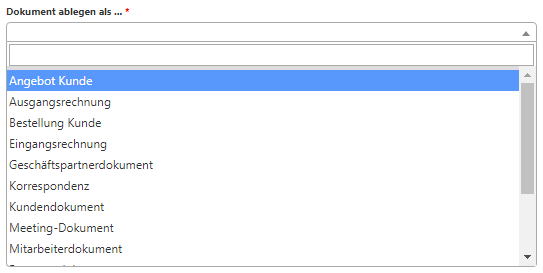
This configuration will render a Select2 widget that makes AJAX request to the Configuration Service Subject /FilingCases;sortBy=displayName;sortDirection=ASC?enabled=true. Only a single option can be selected.
{
    "schema": {
        "properties": {
            "bd_filingCase": {
                "minItems": 0,
                "type": "string",
                "required": true,
                "enum": []
            }
        }
    },
    "form": [
        "bd_filingCase"
    ],
    "uiSchema": {
        "bd_filingCase": {
            "widget": "csSubject",
            "subject": "FilingCases",
            "idProperty": "name",
            "displayProperty": "displayName",
            "sortBy": "displayName",
            "sortDirection": "ASC",
            "filterBy": "enabled=true"
        }
    }
}